Mobile testing – learnings for beginners and advanced testers
Techniques, tools, and loads of tips for folks in the field of mobile testing
Techniques, tools, and loads of tips for folks in the field of mobile testing

Over the last eight months, my software development workflow has changed more than I have ever experienced before. And I say that as someone who has been writing software for about 25 years. I have worked through plenty of programming languages, frameworks, architectural fashions, build tools, frontend revolutions, mobile platform quirks, and enough JavaScript ecosystem […]
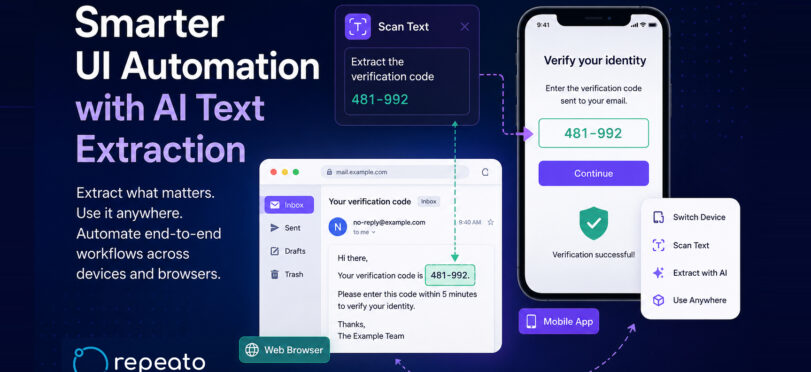
Modern applications are becoming increasingly dynamic. Verification codes, magic links, temporary passwords, order IDs, session tokens, chat invitations, and personalized content appear everywhere — often across multiple devices, apps, or browser windows. Traditional UI automation tools struggle with these workflows. They often rely on brittle selectors, hardcoded regex parsing, fixed layouts, or manual scripting between […]
Yesterday, I had the chance to present Repeato in Motorola’s “GenAI for Developers” open forum and show how modern UI test automation can go beyond simple record-and-playback. Instead of focusing on AI for the sake of AI, I wanted to show something more practical: how a real-world workflow like two-factor authentication (2FA) can be automated […]

In the rapidly evolving landscape of software development, automation has become a crucial component for maintaining efficiency and ensuring quality. As applications grow increasingly complex, the need for more intelligent and intuitive testing solutions has become evident. Enter AI computer vision—a technology poised to revolutionize test automation by providing unprecedented accuracy and simplicity in verifying […]

Whether it’s a fitness app tracking your morning run, a shopping platform offering localized deals, or a travel app suggesting nearby attractions: the ability to accurately determine and utilize a user’s geographical location is paramount. But how do QA teams test if these features work seamlessly across the globe? Enter the world of mock locations.

Is your current testing process taking away from the time you would rather spend developing more apps? Are you looking for a suitable tool for automated Android testing? To optimize test automation for your Android apps, some basic knowledge about Android test automation and relevant tools is crucial. Different projects require different tools for proper test […]

In the fast-paced world of mobile app development, ensuring a seamless user experience across a myriad of devices and platforms is paramount. Developers and QA professionals are increasingly turning to screenshot and snapshot testing tools to streamline this process, allowing them to capture and verify visual outputs efficiently.

In today’s fast-paced digital landscape, ensuring that mobile applications meet stringent regulatory and compliance requirements is paramount for CTOs and QA teams. The challenge lies in maintaining full control over test automation software while customizing it to fit unique operational needs.

In the ever-evolving landscape of mobile application development, ensuring quality and reliability through effective testing is paramount. For developers and QA professionals, finding the right automation tool that aligns with their testing requirements—without breaking the bank—can be a daunting task.

In the rapidly evolving landscape of mobile applications, ensuring seamless functionality across both Android and iOS platforms is a critical challenge for QA professionals. Selecting the right test automation tool is pivotal to streamline processes, enhance efficiency, and maintain high-quality standards in software development.

In the ever-evolving landscape of Android app development, ensuring app quality through robust testing is paramount. However, with an abundance of testing services available, finding the right one can be a daunting task for developers and QA professionals.

In the fast-paced world of Android development and quality assurance, automation tools have become indispensable for enhancing efficiency and ensuring robust application performance. Whether you’re a developer looking to streamline UI testing or a QA professional aiming to improve test coverage, selecting the right automation tool is crucial.

As quality assurance (QA) professionals and developers, the pursuit of the ideal automation tool can be as challenging as finding a needle in a digital haystack. Your experience with Leapwork might have been less than satisfactory, prompting a search for alternatives that better align with your project requirements and ease of use aspirations.

In the fast-paced world of software testing, Leapwork and Autify emerge as cutting-edge, no-code automation platforms designed to streamline the QA process. Leapwork offers a visually intuitive experience with AI capabilities, without the need for coding expertise, and is praised for its ease of creating reusable components across web and mobile platforms.

In the dynamic world of test automation, choosing the right platform can be pivotal. Leapwork and Mabl are leading solutions that streamline testing processes.

In the competitive landscape of test automation platforms, Leapwork and Accelq stand out with their no-code, AI-powered capabilities designed to simplify the testing process. While both cater to a variety of industries and enable testing across web, Android, and iOS platforms, Leapwork is renowned for its ease of creating reusable components and its visual language.

In the dynamic realm of test automation, Leapwork and Android Testify stand out for their unique capabilities. Leapwork is a no-code, AI-powered platform that simplifies test automation across web, Android, and iOS, making it accessible for non-technical users.

In the dynamic realm of test automation, Leapwork and Sauce Labs emerge as leading platforms, each with distinct advantages. Leapwork excels with its no-code, AI-driven test creation, offering a visual approach that empowers non-technical users to automate complex tests with ease.

In this article, we’ll discuss different approaches to mobile app testing, types of mobile app testing, and various tools available to aid in testing and developing mobile applications. We’ll also cover different aspects of mobile app testing, including security, performance, compatibility, usability, regression, automation, and best practices.

Test debt –the additional work and effort required in the future due to shortcuts or compromises taken during the testing process– poses a significant challenge in software development and testing. In this article, we will explore the concept of test debt, its impact on software quality, and effective strategies for managing and mitigating it. By […]

Real device testing is a critical aspect of the mobile app development process, as it allows developers and QAs to test the app’s performance, functionality, and usability on actual, physical devices. This is essential because it helps identify issues that may not be apparent during testing on emulators or simulators. In this article we look at […]

Mobile testing is an essential requirement of flawless user experience: testing apps for their usability and performance is key to success. The two basic ways of testing are manual testing and automation testing. However, picking the right approach for your project is key. In this piece, we’ll go over the most important differences, their benefits […]

This is a question that gets asked quite often. Initially, this took a lot of setup, see the section below on how this used to work before the release of Flutter 2.5 in September 2021.

It’s hard to overestimate how difficult software development has become in recent years. The web and mobile application market is more competitive than it has ever been. In this article, we look at the chances and opportunities that come with low-code mobile testing as well as a few low-code testing tools alternatives.

If you want to reduce the time spent hand-crafting fragile locators, Repeato can help by letting you record and maintain UI tests quickly without writing much code. Because it uses computer vision and AI, it can be a practical option when XPath quoting or locator maintenance becomes a recurring pain point in iOS, Android, or […]

If your automated UI tests depend on live or manually prepared database data, failures can quickly become inconsistent and hard to diagnose. A test may pass on one machine, fail on another, or break after a database update simply because the underlying data is no longer in the expected state. The most reliable approach is […]

For teams that want to reduce the learning curve, Repeato can be a helpful option. It is a no-code test automation tool for iOS, Android, and web apps, so beginners can start creating automated tests quickly without first becoming fluent in a programming language. Because it uses computer vision and AI, it can also be […]

If you need to test the performance of a Java-based enterprise application, the key decision is not just which tool is popular, but which tool matches the kind of load you want to simulate. In most cases, the best results come from using a dedicated load-testing tool rather than trying to reuse browser automation for […]

When your test list is too large to execute in full, the goal is not to “test everything.” The goal is to test the right things first so you can reduce release risk and make the best use of the time you have. This guide turns the most practical approaches into a simple decision framework […]

If your tests depend on a clean browser state, clearing localStorage before a specific test group is a practical way to avoid hidden side effects. This is especially useful when one test stores login state, feature flags, preferences, or cached data that could influence the next test. Why this matters localStorage persists across page loads […]
Over the last eight months, my software development workflow has changed more than I have ever experienced before. And I say that as someone who has been writing software for about 25 years. I have worked through plenty of programming languages, frameworks, architectural fashions, build tools, frontend revolutions, mobile platform quirks, and enough JavaScript ecosystem […]
This error is often shown when an active Xcode installation is needed, but xcode-select still points to the Command Line Tools directory.

The subject of software test engineering is very wide-ranging and interdisciplinary. Here comes a detailed overview on the role of a software engineer, what test engineering is, the fundamentals of the job, a few insights into software testing, and much more.
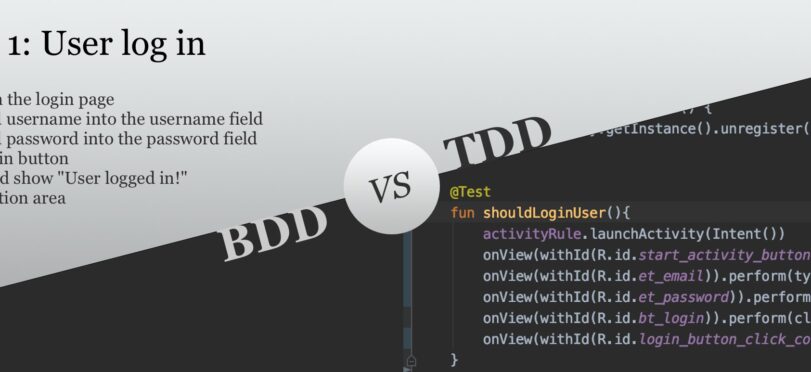
TDD and BDD are two types of software development practices. TDD stands for test-driven development, while BDD is a short form of behavioral-driven development. The names of both sound similar, but of course, they are not! Please do not get them confused. A brief explanation of TDD: we specify what a program should do by […]

Bug tracking tools can help you discover and manage software bugs faster and thus save you a lot of time and other resources. In this blog post, we are going to take a closer look at popular bug tracking tools, their strengths, and pricing.
Real device testing is a critical aspect of the mobile app development process, as it allows developers and QAs to test the app’s performance, functionality, and usability on actual, physical devices. This is essential because it helps identify issues that may not be apparent during testing on emulators or simulators. In this article we look at […]

Encountering the “Element … is not clickable at point (x, y)” error in Selenium can be a common hurdle during automated test execution. This issue typically arises when the intended element is obscured by another element or is not within the visible viewport. Below, we outline practical solutions to address this problem effectively. Common Causes […]

If you’re attempting to use the Layout Inspector tool for apps installed from Google Play, you may have encountered some challenges. While it is straightforward to inspect apps that you’ve developed yourself, inspecting official apps can pose a unique set of obstacles. This guide will explore practical solutions to help you navigate these challenges effectively. […]

If you’ve encountered the error message: “The message port closed before a response was received” while developing or testing a Chrome extension, you’re not alone. This error can be perplexing, but it’s often related to issues with Chrome extensions. Let’s explore the potential causes and solutions to this problem. Understanding the Error This error typically […]

Katalon Studio is a powerful tool for test automation, but users often encounter challenges when attempting to export recorded test scripts to Java/JUnit. This can be especially problematic for those working with applications that are only compatible with Internet Explorer, limiting the use of Selenium IDE. In this guide, we will explore how you can […]

Integrating Katalon Studio with Jenkins in a Docker environment can streamline your continuous integration (CI) process. This guide provides a step-by-step approach to setting up your Katalon test suite to run efficiently on a Jenkins server hosted within a Docker container. Setting Up Katalon Studio for Docker Katalon Studio offers a Linux version suitable for […]

Automating file uploads to a website can present a unique set of challenges, especially when aiming to execute scripts in headless mode. The goal is to upload a list of files sequentially without requiring browser focus. Below, we explore effective strategies to achieve this using Selenium WebDriver, avoiding system-dependent dialog interactions. Understanding the Challenge Typically, […]
Whether it’s a fitness app tracking your morning run, a shopping platform offering localized deals, or a travel app suggesting nearby attractions: the ability to accurately determine and utilize a user’s geographical location is paramount. But how do QA teams test if these features work seamlessly across the globe? Enter the world of mock locations.
Mobile testing is an essential requirement of flawless user experience: testing apps for their usability and performance is key to success. The two basic ways of testing are manual testing and automation testing. However, picking the right approach for your project is key. In this piece, we’ll go over the most important differences, their benefits […]

…or is there even a distinction between validation and verification? Testers get asked these questions on a daily basis – “Have you verified the system? Have you validated the feature?” The terms validate and verify are frequently used interchangeably, but what exactly do they imply? Is there a distinction? Yes, and you must do both […]

The mobile app market is unabashedly thriving. With countless companies releasing new apps every day, it’s increasingly important for your app to stand out from the rest. A key differentiator is app quality: your app must be bug-free and provide users with a pleasant experience. But how to get started with mobile app testing? Here […]

If you want a Container with a border and rounded corners in Flutter, the key is to use borderRadius inside BoxDecoration. A common mistake is to try clipping the widget after adding the border, which can remove or hide the border instead of rounding it cleanly. The simplest solution For most cases, you can keep […]

If you need to inspect a database or other app files stored under /data/data/<package-name>, the good news is that you often do not need to root the device. The right approach depends on whether the app is debuggable, whether you are using Android Studio, and whether you only need a one-time copy of the file […]

If you are trying to use ADB to grant or revoke runtime permissions and you hit a security error, the short version is this: the command is allowed only when the device has been configured to permit it. On many Android devices, especially those running vendor-specific Android builds, you must enable a developer setting that […]

How to use adb grant and adb revoke correctly If you want to change an app’s runtime permissions from the command line, the key thing to know is that these commands are used through pm inside an ADB shell session. The syntax is not just the permission name by itself; you need both the package […]

Updating macOS often brings improvements and new features, but it can also introduce unexpected issues. One such problem many users encounter is the error message: xcrun: error: invalid active developer path (/Library/Developer/CommandLineTools), missing xcrun at: /Library/Developer/CommandLineTools/usr/bin/xcrun This error typically arises after a macOS update or even a simple restart. It can prevent Git and other […]

For developers working with Xcode 4, adding existing frameworks to a project can initially seem challenging due to the absence of the familiar “Add Existing Frameworks” option. This guide will walk you through the process using the most effective method available, ensuring your development process remains efficient and seamless. Step-by-Step Guide to Adding Frameworks Follow […]
Katalon Studio is a popular all-in-one automation tool, but like any platform, it has its limitations. Below is an overview of known constraints in functionality, performance, integrations, and usability that users commonly encounter, along with practical insights for those considering Katalon as their automation solution. Functionality Limitations Single Scripting Language: Katalon uses Groovy (Java) as […]

In certain scenarios, developers may encounter situations where the rules of Automatic Reference Counting (ARC) in Xcode can be restrictive. Whether it’s for unit tests or specific mock objects, there might be a need to disable ARC for individual files. This guide will walk you through the process of disabling ARC for a single file […]

If you’ve encountered an error message like the one below while running commands that require xcode-select, you’re not alone: xcode-select: error: tool ‘xcodebuild’ requires Xcode, but active developer directory ‘/Library/Developer/CommandLineTools’ is a command line tools instance This issue typically arises when the Xcode-select developer directory is incorrectly set to the Command Line Tools instead of […]

Encountering the “Multiple commands produce” error in Xcode 10 can be a common hurdle for developers transitioning from Xcode 9. This error typically arises due to conflicts in file handling during the build process, often related to duplicate file entries in the build phases. Below, we explore the most effective solutions to tackle this issue. […]

Downloading Xcode directly as a DMG or XIP file can be a necessity for developers who need to manage different versions or for troubleshooting purposes. This guide will walk you through the process of downloading these files from the official Apple sources. Step-by-Step Guide to Download Xcode Create or Log into Your Apple Developer Account: […]

When working with Xcode projects, managing your version control system efficiently is crucial. A well-crafted .gitignore file can help you avoid committing unnecessary files, keeping your repository clean and manageable. This guide will walk you through creating an optimal .gitignore file tailored for Xcode projects. Understanding the Essentials The primary purpose of a .gitignore file […]

Conditional compilation is a technique often used in programming to include or exclude parts of code depending on specific conditions. In languages like C and Objective-C, this is typically done using preprocessor directives such as #ifdef. For Swift developers, achieving similar functionality requires a different approach. This guide will walk you through the steps to […]